
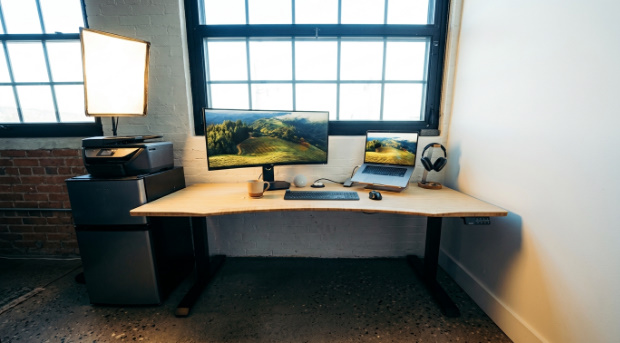
We compared 8 standing desks for shorter Canadians with back pain, and the Desky Dual Ergo Edge came out as the clear winner. Its 23.6-inch minimum height suits users as short as 4’11″ without forcing awkward elbow angles. Built-in cable channels, a mobile app for sit-stand reminders, and Siri voice control help shorter users maintain clean posture habits all day.
Roughly 40% of standing desk users develop low back pain from prolonged standing alone, according to University of Waterloo research [1]. Alternating positions at the right desk height is what actually protects your spine.
This list ranks 8 desks available in Canada on the specs that matter most for shorter frames, whether you work from a home gaming setup, a compact flat, or a shared family office.
Why Desk Height Matters More Than You Think for Shorter Users
The CCOHS recommends alternating between sitting and standing throughout your workday to reduce spinal fatigue [2]. Most standing desks bottom out at 28 inches, forcing anyone under 5’4″ to raise their chair, dangle their feet, or hunch forward to reach the keyboard.
Proper ergonomic positioning requires feet flat on the floor, elbows at 90 degrees, and wrists neutral when typing. A desk 23 to 25 inches high makes that possible for petite frames without footrests or stacked cushions.
Four criteria separate a back-friendly standing desk from one that makes things worse:
- Minimum height under 25 inches: Anything above 28 inches locks shorter users into poor posture while seated.
- Sit-stand reminders or app integration: A 30-minute sit to 15-minute stand ratio reduces low back pain effectively [3]. A desk that prompts you to switch removes the guesswork.
- Integrated cable management: Loose cables restrict leg movement and discourage position changes.
- Quiet dual motors: Shared spaces and video calls demand sub-50 dB operation. Single motors vibrate more and wear faster under heavy loads.
8 Standing Desks for Short People with Back Pain Compared
| # | Brand | Model | Min Height | Weight Capacity | Key Feature | Best For |
| 1 | Desky | Dual Ergo Edge | 23.6″ | 308.6 lbs | App + Siri control, built-in cable management | Short users wanting smart ergonomics |
| 2 | RiseDesk | RiseDesk | 28.3″ | 310 lbs | Smooth lift, Canadian-made | Taller-short users (5’3″+) who want local support |
| 3 | Fezibo | Basic | 28.4″ | 155 lbs | Budget price point | Light setups on a tight budget |
| 4 | PrimeCables | Dual-Motor | 28.3″ | 275 lbs | Affordable dual motor | Budget-conscious Canadians with moderate gear |
| 5 | Autonomous | Desk 2 | 28.3″ | 250 lbs | Wide desktop options | WFH setups with basic needs |
| 6 | IKEA | TROTTEN | 28.4″ | 110 lbs | Lowest upfront cost | Minimalist single-monitor setups |
| 7 | AnthroDesk | Dual Motor | 27″ | 300 lbs | 7-year Canadian warranty | Canadian buyers wanting local support |
| 8 | MotionGrey | Motion Series | 23.6″ | 230 lbs | Designed in Canada | Canadian buyers wanting local warranty |
The 8 Best Standing Desks for Short People with Back Pain in Canada (2026)
1.Desky Dual Ergo Edge Sit Stand Desk– Smart Ergonomics, Built for Every Height
The Desky Dual Ergo Edge adjusts from 23.6 to 49.2 inches, one of the widest usable ranges on the Canadian market. The ergo-edge cutaway front lets your torso sit closer to the screen, reducing the forward hunch that can strain your back during long sessions.
Cable management runs through purpose-designed channels under the frame, with optional power boards supporting up to 9 outlets. The Desky app syncs via Bluetooth to track sitting and standing habits, send posture reminders, and save height presets. Siri voice commands let you adjust hands-free during calls.
The dual-motor system lifts 308.6 lbs at 1.4 inches per second, under 50 dB, handling multi-monitor setups and PC towers without wobble. We paired the frame with the hardwood walnut desktop, their bestseller, and noticeably more solid than laminate options.
Explore Desky’s Dual Ergo Edge standing desk athttps://desky.ca/products/dual-ergo-edge-sit-stand-desk to find the height range and desktop finish that fits your setup.
Pros:
- Lowest minimum height (23.6″) suits users from 4’11″ and up
- Built-in cable channels with an optional 9-outlet power board
- App-driven sit-stand tracking with Siri voice control
- 308.6 lb capacity handles multi-monitor and gaming setups
Cons:
- Premium desktop materials add to the base price
- App features require Bluetooth pairing
Best for: Shorter Canadians with back pain who want smart ergonomic features, built-in cable management, and serious load capacity for home office or gaming setups.
2. RiseDesk – Canadian-Made with a Smooth Lift
RiseDesk builds its standing desks in Toronto and ships across Canada with a 10-year frame warranty. The height range of 28.3 to 45.2 inches works for users around 5’3″ and above, but pushes ergonomic limits for anyone shorter. Four memory presets and anti-collision technology come standard.
The 310 lb weight capacity handles dual monitors and heavy gear, and the lift mechanism is one of the smoothest on this list. RiseDesk does not include built-in cable management or app integration, so you will need third-party solutions for cord organization. Stock availability has been inconsistent for Canadian buyers.
Pros:
- Canadian-designed with a 10-year frame warranty
- 310 lb capacity supports heavy setups
- Smooth, quiet lift mechanism
Cons:
- 28.3-inch minimum is a stretch for users under 5’3″
- No built-in cable management
- Stock availability can be unpredictable
Best for: Taller-short Canadians (5’3″+) who value local manufacturing and a generous warranty.
3. Fezibo Basic – Budget Entry Point for Light Setups
Fezibo offers its Basic standing desk as one of the most affordable electric options on the market, starting around $169 USD. The single motor adjusts from 28.4 to 46 inches with a 155 lb capacity, three memory presets, and anti-collision detection.
The single motor limits lift speed to about 0.75 inches per second, and stability at full extension handles a monitor and laptop, but not much more. Customer service reviews are mixed.
Shorter users around 5’3″ to 5’5″ can make this desk work with an adjustable chair, though anyone under 5’2″ will find the seated position uncomfortably high.
Pros:
- One of the lowest price points for an electric standing desk
- Anti-collision technology protects gear
- Easy solo assembly
Cons:
- Single motor limits stability and lift speed
- 155 lb capacity restricts heavier builds
- Customer service can be inconsistent
Best for: Budget-conscious buyers in the 5’3″ to 5’5″ range with a simple laptop-and-monitor setup.
4. PrimeCables Dual-Motor – Budget Dual Motor for Canadian Buyers
PrimeCables has manufactured affordable tech accessories in Canada for over a decade. The dual-motor frame spans 28.3 to 47.6 inches with a 275 lb lifting capacity, three memory presets, and anti-collision detection.
The 28.3-inch minimum suits users around 5’3″ and up, but requires chair adjustments for more petite frames. The desktop ships as a two-piece surface on some configurations, creating a visible seam.
Free shipping across Canada and accessible pricing make PrimeCables a practical choice for dual-motor reliability without premium cost.
Pros:
- Dual motor with 275 lb capacity at a budget price
- Free shipping across Canada
- 10+ years of manufacturing in Canada
Cons:
- 28.3-inch minimum is a stretch for users under 5’3″
- Desktop is two pieces on some models
- Limited desktop material choices
Best for: Canadian buyers on a moderate budget who need dual-motor power for a heavier setup.
5. Autonomous Desk 2 – Wide Desktop, but Limited for Shorter Users
Autonomous markets its Desk 2 as a home office all-rounder with a 53 x 29 inch desktop and 2-stage leg frame. The 28.3 to 47.5 inch range and 250 lb capacity cover standard use cases with memory presets for quick changes.
The 2-stage legs limit range compared to 3-stage alternatives, and the 28.3-inch minimum means shorter users work against the ergonomics from the start. Canadian stock can be limited, delaying delivery by weeks. The frame carries a 10-year warranty, though the desktop gets only 1 year.
Pros:
- Generous 53 x 29-inch desktop for dual monitors
- 10-year frame warranty
- Memory presets for fast transitions
Cons:
- 2-stage legs limit the height range at both ends
- 28.3-inch minimum is uncomfortable under 5’3″
- Canadian stock can be limited
Best for: WFH users 5’4″ and above who want a wide work surface with reliable warranty support.
6. IKEA TROTTEN – Manual Crank at the Lowest Upfront Price
IKEA’s TROTTEN costs around $249 CAD, the most affordable option on this list. The manual crank adjusts from 28.4 to 47.25 inches with a 110 lb capacity and a 4.7/5 rating across 500+ reviews.
The manual crank is the core trade-off. Physical cranking discourages the frequent transitions, research says you need every 20 to 30 minutes. Some reviewers report the handle loosening after months. The 110-lb limit and 28-inch minimum make this a single-monitor desk for taller and shorter users.
Pros:
- Lowest upfront cost at ~$249 CAD
- High user ratings for sturdiness
- Available at IKEA stores across Canada
Cons:
- Manual crank discourages frequent changes
- 110 lb capacity limits setup options
- No presets, no app, no cable management
Best for: Budget buyers who want a simple, sturdy single-monitor desk and do not mind manual cranking.
7. AnthroDesk Dual Motor – Canadian Warranty, Higher Starting Point
AnthroDesk sells its standing desks through anthrodesk.ca with a 7-year Canadian warranty covering all parts. The dual-motor frame adjusts from 27 to 46 inches with a 300 lb capacity, and the controller offers two programmable presets plus a home button for your default seated position.
The 27-inch minimum height is lower than most competitors on this list but still above the 23 to 25 inch range that shorter users need for proper seated ergonomics. No app integration, no cable management system, and limited desktop finish options keep the AnthroDesk in entry-level territory despite the solid frame specs.
Pros:
- 7-year Canadian warranty on all parts
- 300 lb dual-motor capacity handles heavy setups
- Ships from Canada with local support
Cons:
- 27-inch minimum is still too high for users under 5’2″
- Only 2 memory presets (vs 4 on most competitors)
- No app control or built-in cable management
Best for: Canadian buyers who want local warranty support and a sturdy dual-motor frame, and who fall in the 5’2″ to 5’5″ range.
8. MotionGrey Motion Series – Canadian-Designed with Room to Improve
MotionGrey designs its Motion Series in Canada and ships it free nationwide. The three-stage frame adjusts from 23.6 to 49 inches with dual Bosch motors, a 230 lb capacity, and noise around 40 dB. An 8-year warranty and 30-day trial lower the risk for first-time buyers.
The lighter frame produces some wobble at full standing height on wider configurations, and the 230 lb capacity falls short for heavier setups. No app integration or cable management is included.
Pros:
- Designed in Canada with free nationwide shipping
- 23.6-inch minimum height accommodates shorter users
- 8-year warranty and 30-day trial
Cons:
- 230 lb capacity limits heavier builds
- Lighter frame wobbles at full height on wider desktops
- No app integration or cable management
Best for: Canadian buyers who want a locally designed mid-range desk with a decent height range.
Warning Signs of a Standing Desk That Will Make Your Back Worse
A standing desk with the wrong specs turns a back pain solution into a back pain cause. Watch for these red flags before you buy:
- Minimum height above 28 inches with no workaround: Your shoulders and spine compensate every single day if the desk cannot reach your seated elbow angle. A footrest helps, but it is a patch.
- No height presets or memory settings: Guessing your ideal height each time leads to “close enough,” and close enough leads to pain over weeks.
- Wobble or lateral sway at standing height: Your arms and shoulders absorb that instability during typing and mouse work. Tap the surface at max height before buying.
- Single motor with low weight capacity: Single motors strain above 150 lbs and vibrate more. A dual-motor handle supports monitor arms, PCs, and peripherals without issue.
FAQs
What height should a standing desk be for someone under 5’4″?
Your seated desk height should place your elbows at 90 degrees with your feet flat on the floor. For most people under 5’4″, that means a minimum between 22 and 25 inches. Desks above 28 inches typically require a footrest.
Can a standing desk actually help with back pain, or does it make things worse?
Sit-stand desks reduce low back discomfort when you alternate positions throughout the day [3]. Prolonged standing alone increases pain for roughly 40% of users [1]. Switching postures every 20 to 30 minutes is the key.
How long should you stand at a standing desk if you have back pain?
The CCOHS recommends varying positions throughout the day, with intervals from 15 to 60 minutes depending on tolerance [2]. Starting with 15-minute standing blocks lets your back muscles adapt gradually.
Does the Desky Dual Ergo Edge work for someone who is 5’0″ and has chronic back pain?
The 23.6-inch minimum height reaches the proper ergonomic range for users as short as 4’11″. The ergo-edge cutaway lets you sit closer to your screen, reducing forward lean. App-based sit-stand reminders actively coach better posture habits rather than leaving them to willpower.
Is the Desky app necessary, or can the desk work without it?
The desk works fully through its physical control panel and four built-in memory presets. The app adds sit-stand tracking, posture reminders, and Siri integration. The reminders are especially useful for building a consistent habit of alternating for back pain management.
The Bottom Line
The Desky Dual Ergo Edge delivers the lowest practical minimum height, smartest posture tools, and cleanest cable setup on this list for shorter Canadians with back pain. The 23.6-inch starting point, app-driven reminders, and Siri control address the two things that matter most: getting the height right and actually alternating throughout the day.
Every other desk on this list has merit for specific budgets and use cases. RiseDesk and PrimeCables offer Canadian-made alternatives, MotionGrey provides a mid-range option, and the TROTTEN works for buyers who just need something simple.
Start with the height range, confirm the weight capacity, and pick the desk that removes the most friction from switching postures.
References
[1] University of Waterloo. (2020). Standing desks may lead to lower back pain. https://uwaterloo.ca/news/news/standing-desks-may-lead-lower-back-pain
[2] Canadian Centre for Occupational Health and Safety (CCOHS). Office Ergonomics – Sit/Stand Desk. https://www.ccohs.ca/oshanswers/ergonomics/office/sit_stand_desk.html
[3] Karakolis, T., & Callaghan, J. P. (2017). Sit-stand workstations and impact on low back discomfort: a systematic review and meta-analysis. https://pubmed.ncbi.nlm.nih.gov/29115188/